Orders & customers / Step-by-step
Complete an order in three clean moves.
Read every requirement, prepare the full set of eligible plants, then use the order manager’s confirmation control to select and submit them.
Before you select plants
Turn every line on the order into a check
| Order line | Your action | If it does not match |
|---|---|---|
| Quantity | Prepare that many fully qualifying plants. | Grow or reserve the missing number first. |
| Size | Use only plants with the listed Small, Medium, or Large size. | Choose another species; appearance does not change its size tag. |
| Traits | Make sure each candidate carries every named trait. | Replace the candidate or recheck the journal. |
| Growth stage | Wait until the plant reaches the stage required by the order. | Keep caring for it and reopen the order after it grows. |
Exact action
Complete the order from start to finish
Read the full order before growing stock
Open the order manager and note the requested quantity, size, and every named plant trait.
Do not match by appearance alone. A plant can look suitable while missing a required journal trait.
Prepare and reserve the complete set
Grow enough matching plants until they are eligible, then mark them not for sale while you finish the quantity.
If ordinary customers can still buy the plants, your ready count may fall before submission.
Select the plants and confirm
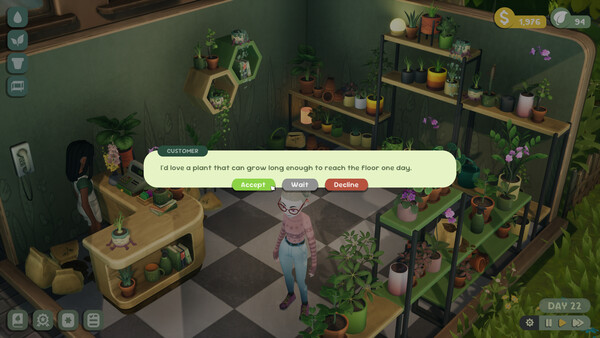
Return to the order manager, choose the confirmation control, select the eligible plants, and submit the set.
If the control is absent, stop and check quantity first, then growth stage and traits.
Worked example
For Medium + Pet Friendly + Low Light
All three pass that exact combination in the verified subset. Prepare the quantity shown on your order, wait for the required growth stage, mark the chosen plants not for sale, then select them through the order manager.
If the order adds another trait, this shortlist may change. Put every extra condition into the matcher before growing the batch.
Exception
If the green confirmation is missing
Compare the qualifying count with the requested quantity, wait for early growth stages to finish, verify every trait in the journal, and replace any plant that was sold or assigned elsewhere.
Official Patch 1.0.3
Trailing-trait orders now wait until reputation level 4
The same update fixed a crash caused by selecting one plant for more than one customer while the game was paused. Update before comparing an older order flow with this guide.